CyLock MFA for Mac Desktop Login
macOS systems are widely trusted for their stability and security, yet username and password logins still remain a vulnerable point of entry. Even on Mac devices, weak passwords, credential reuse, phishing attacks, and compromised passwords can allow unauthorized users to gain access.
CyLock MFA eliminates this risk by adding a powerful second layer of verification to the macOS desktop login process. Instead of depending only on passwords, users must authenticate using additional methods such as Push Notification, TOTP, QR Scan, or CR-OTP, Grid Authentication etc. This ensures that even if the password is leaked or compromised, the login attempt is blocked unless the user verifies their identity through CyLock. It helps enterprises enforce Zero-Trust security, prevent credential theft, and protect sensitive data on MacBooks and workstations.
To enable this security, CyLock provides a lightweight and secure CyLock Mac Desktop Plugin, specifically designed to enforce MFA during macOS system login. This plugin integrates seamlessly with the native login screen and works for both online and offline authentication scenarios. The process remains smooth for users and highly secure for organizations.
CyLock MFA enables secure:
-
Local or domain login on macOS desktops and laptops
-
Authentication with multiple MFA methods
-
Secure access even when the device is offline
With centralized management, detailed audit logs, and easy deployment, CyLock strengthens macOS endpoints across corporate, remote, and BYOD environments—ensuring only verified users can log in
Secure macOS Desktop Login – CyLock MFA Workflow
-
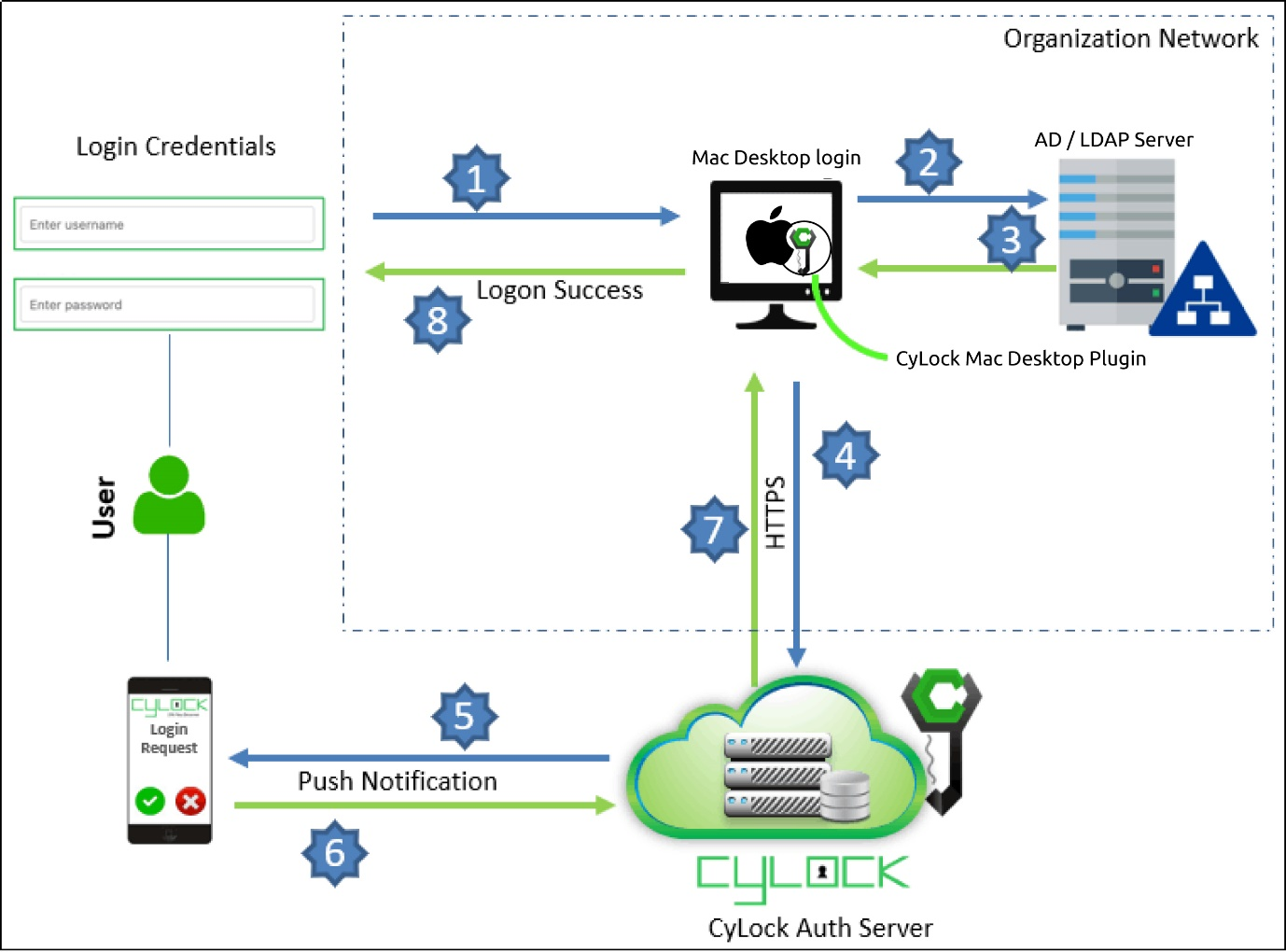
The user enters their macOS username and password (1FA) on the desktop login screen.
-
The operating system validates the credentials locally or against Active Directory/LDAP.
-
After successful password verification, the CyLock Mac Desktop Plugin is triggered.
-
The plugin communicates with the CyLock Authentication Server to initiate the MFA.
-
Based on the user’s preferred authentication method, CyLock prompts the user to complete MFA.
-
The user completes the MFA challenge, and the response is sent back to the CyLock Authentication Server.
-
If authentication is successful, the login is approved and the user is granted access to the macOS desktop; if not, access is denied.
Authentication Options
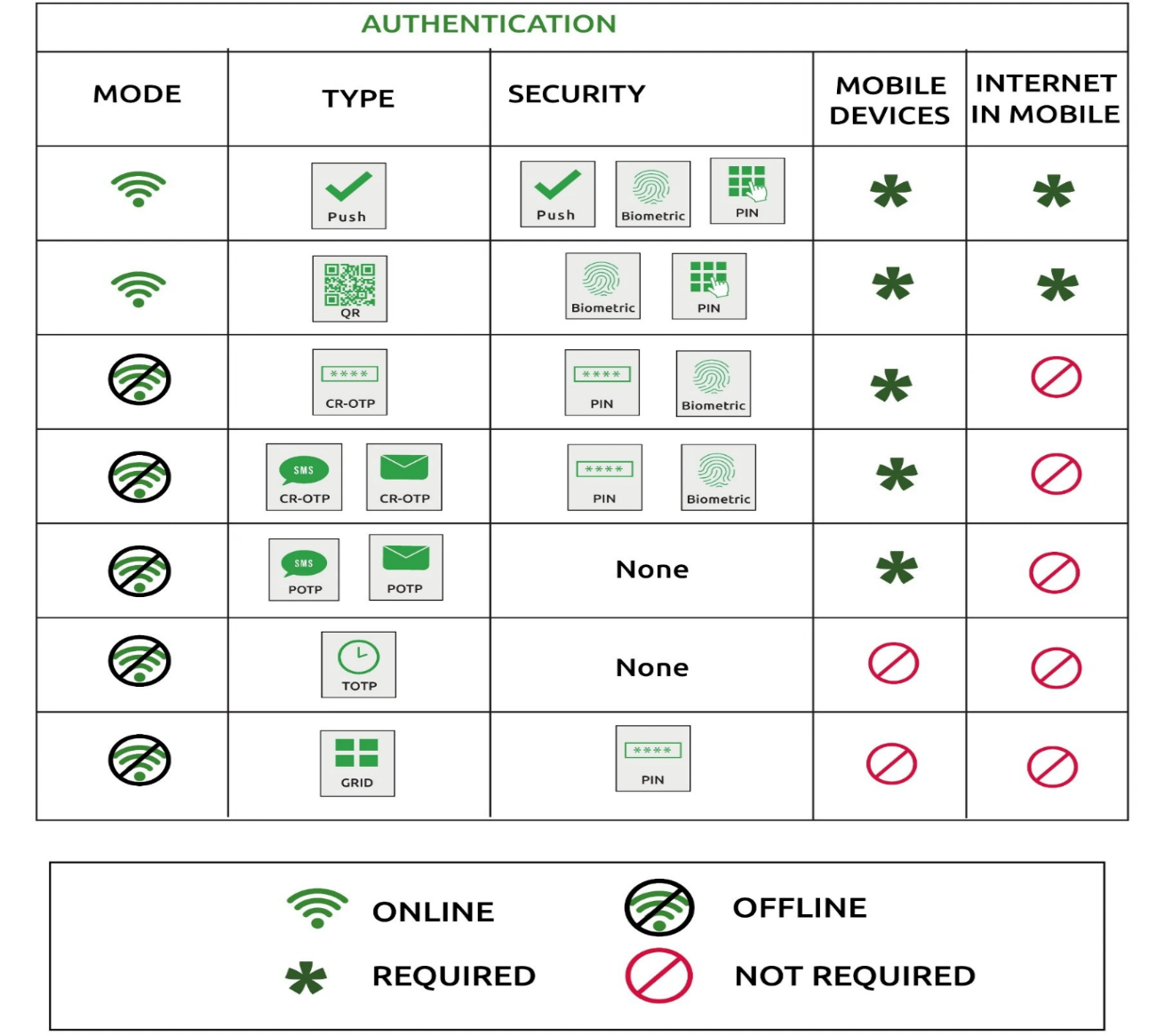
In addition to strong password policies, organizations can enable CyLock MFA to secure macOS desktop login with an extra verification layer. Multi-factor authentication protects users and endpoints against credential theft, phishing, and unauthorized access, ensuring that only verified users can log in to corporate Mac devices.
The table below lists the authentication modes and security options supported during macOS desktop login through the CyLock Mac Desktop Plugin.
Benefits of Enabling CyLock MFA for Mac Desktop Logon
-
Prevents Unauthorized System Access:
Even if passwords are leaked or guessed, login is blocked without completing MFA through CyLock. Eliminates risks from phishing, credential stuffing, brute force attempts, and password reuse.
-
Protects Enterprise Data on macOS Devices:
Ensures only verified and trusted users can access corporate MacBooks and workstations.
-
Seamless User Experience:
The CyLock macOS Desktop Plugin integrates with the native macOS login screen, offering secure access with minimal user friction.
-
Works Online & Offline:
Maintains strong MFA enforcement for both online and offline users.
-
Pure Offline Authentication Mode:
when the endpoint is unable to communicate with the CyLock Authentication Server, local offline authentication allows users to log in to desktops without blocking access, ensuring business continuity.
-
Supports Multiple Authentication Methods:
Push Notification, TOTP, QR Code Scan, and CR-OTP, Grid Authentication etc., provide flexible and convenient login options.
-
Centralized User Management & Monitoring:
Admins can centrally manage users, devices, authentication logs, and security policies.
-
Group-Based Policy Assignment:
Organizations can create day-wise and time-based access filters, allowing users to log in only during permitted days or hours. Access is blocked automatically outside the allowed window also Admins can set a preferred MFA method per group or user, ensuring consistent authentication practices across the organization in the policy. Policies can be assigned to specific user groups—ideal for enforcing different login rules for departments, roles, or security levels.
-
Session Control:
Administrators can define how long a user session remains active. Once the session expires, the user must re-authenticate, preventing unauthorized continuous access.
-
Zero-Trust Desktop Security:
Login access is never based on passwords alone—identity verification is mandatory every time and helps enterprises meet Compliance standards.
-
Rapid Deployment across Large macOS Fleets:
Lightweight plugin, minimal configuration, and scalable deployment for enterprise environments.
CyLock MFA for macOS desktop login is a vital security solution that adds an extra layer of protection against unauthorized access, safeguards sensitive enterprise data, and helps organizations maintain compliance with industry regulations. With the rise of remote work and increasing cyber threats, securing Mac desktops has never been more critical.
Looking to strengthen macOS desktop logon security in your organization? Contact us today to learn how CyLock MFA can keep your Mac endpoints safe and compliant.