Secure Windows Logon with CyLock Biometric MFA
In today’s hybrid workplaces, securing employee endpoints is critical. With CyLock MFA’s Windows Logon using Biometrics, you can effortlessly strengthen desktop authentication by adding a secure fingerprint scan as a second factor — on top of your Active Directory or local password authentication. It’s simple for users — and powerful for your security team.
CyLock Custom Credential Provider integrates seamlessly into Windows environment, working with certified and industry-standard fingerprint scanners. You get enterprise-grade security, centralized control, and the peace of mind that every login is protected by something your users know (password) and something they are (biometric).
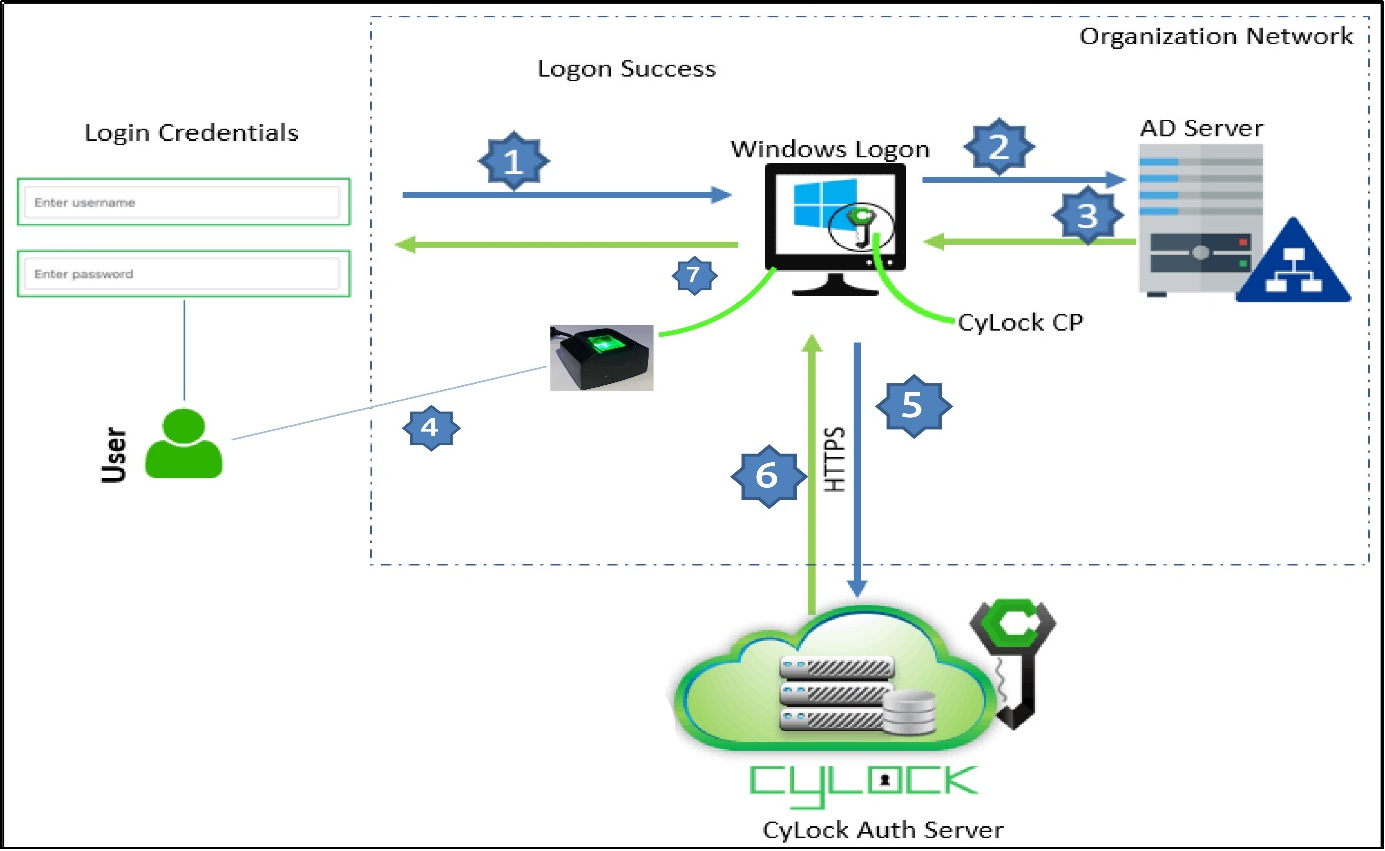
Secure Windows Desktop Logon with CyLock Biometric MFA workflow
This workflow shows how CyLock’s custom Credential Provider combines password verification with fingerprint authentication to secure Windows desktops with strong, user-friendly multi-factor access.
-
The user enters their username and password at the Windows login screen.
-
The CyLock Credential Provider (CP) captures the entered credentials and forwards them to the AD Server or local.
-
The AD Server validates the username and password. If correct, it responds to the CyLock CP with a success status for the first factor.
-
After successful password verification, the user keeps their fingerprint on the connected, fingerprint device for verification.
-
The scanned fingerprint data is securely sent via HTTPS to the CyLock Authentication Server for fingerprint verification.
-
The CyLock Auth Server matches the fingerprint data against the encrypted biometric data stored in its database for that user.
-
If the fingerprint matches, the CyLock Credential Provider completes the MFA process and grants the user access to the Windows system.
Note: If the biometric device is unavailable or fails or becomes faulty, the user can authenticate using an offline fallback method such as POTP SMS/Mail, GRID, or TOTP (E.g.: Google authenticator, Microsoft Authenticator, CyAuth Authenticator)
Why CyLock for Biometric Windows Logon?
-
Custom Credential Provider: Fully integrated with Windows logon for robust credential protection and a smooth user experience.
-
Trusted Biometric Hardware: Compatible with certified and industry-standard fingerprint scanners to ensure accurate scans and strong anti-spoofing protection.
-
Strong Anti-Spoofing Protection: CyLock MFA, paired with certified and industry-standard fingerprint scanners, uses liveness detection to ensure only genuine, live fingerprints are accepted — blocking fake or copied prints.
-
Detailed Audit Trails: Monitor and report on every logon attempt with timestamps, user info, and outcome for better compliance and security insights.
-
Offline Authentication Support: Users can authenticate securely even when the endpoint is offline — with pure offline authentication supported if the system cannot connect to the CyLock Authentication Server, and fallback options available to ensure uninterrupted access.
-
Flexible Fallback Factors: If the fingerprint scanner is unavailable or scan fails or becomes faulty, CyLock ensures your users are never locked out. Fallback options include TOTP, GRID authentication, or POTP via SMS/email — to ensure secure access under any condition.
-
Unified CyLock MFA Platform: Extend strong MFA beyond Windows logon — protect VPNs, web apps, cloud services, and more, all with CyLock’s unified solution.
-
Centralized Management: Enroll / Register fingerprints, manage users and biometric devices from CyLock’s unified admin console.
Key Security Highlights
Dual-factor authentication: AD/local + fingerprint scan Offline support & fallback modes (TOTP, Grid, POTP SMS/Email) Biometric data is stored securely in encrypted format Protection against credential theft & replay attacks Centralized management & detailed logging Part of CyLock’s unified MFA suite for all access scenarios
Prerequisites for Windows Logon with CyLock Biometric MFA
To successfully deploy CyLock’s biometric desktop authentication, please ensure the following components are installed:
-
Install the necessary certified and industry-standard fingerprint scanners drivers on every endpoint where users will perform biometric authentication.
-
Install the CyLock Web API Client driver only on the systems used to access the CyLock Admin Portal. This enables secure registration and management of users’ biometric data.
-
Install the CyLock Custom Credential Provider on all Windows target systems where you want to enforce multi-factor authentication with biometrics for secure desktop logon.
Summary
CyLock’s Windows Logon with Biometric MFA secures every desktop by combining AD or local password authentication with a fingerprint scan. With trusted biometric devices, a custom Credential Provider, and flexible fallback options like TOTP or OTP via SMS/email, it delivers strong, user-friendly multi-factor protection. Centralized management, encrypted biometric data, and detailed audit logs ensure robust security and compliance — all as part of CyLock’s unified MFA platform.